

Open source database · Apache-2.0
DDBD
Schemaless record database with writer-based access control (WBAC).
Let your agents work on your data without an admin in the loop.
curl -fsSL https://cdn.broadwayinc.com/get/ddbd/v1 | sh- Linux and macOS
- One binary
- HTTP and JSON
00 · The solution
No server in the middle
With writer-based access control (WBAC), the client that writes a record decides who may read it, and DDBD enforces that on every request. The access rules live with the data, inside the database.
So browsers, serverless functions and AI agents talk to DDBD directly over HTTP, each with its own sign-in. Clients get full control of their data, and there is no backend to write, host or scale just to guard it.
Truly serverless
Your app needs no backend of its own to guard its data. Browsers and serverless functions call DDBD directly, and the database checks each record’s rules itself.
Safer AI agents
Each agent gets its own key: capped at an access level, limited to some collections, read-only if you want, set to expire, and revocable at any time. What it saves names the key that saved it.
Scales at low cost
Nothing in the middle to run: clients talk to one binary. Each record’s access level and keys are written with it, so a query reads one ready range and its cost follows the page it returns, not the size of the data.
01 · Storage
No schema, JSON store
There is no schema and no index to set up. With each record, the user who saves it names its collection, access level, tags and indexes. DDBD turns those into sorted keys and writes them together with the record in one atomic step.
A query reads one range of those keys for each access level the reader may read, merged in order. It starts at the first match and stops when the page is full, so its cost follows the page, not the size of the collection.
// postRecord body
{
  "data": { "title": "Desk Lamp", "color": "red" },
  "config": {
    "collection": { "name": "products", "access_level": "05" },
    "index": [{ "name": "price", "value": 1200 }],
    "tags": ["sale"]
  }
}02 · Access
Access rules belong to each record
The user who writes a record decides who can read it, and DDBD checks it on every read. There are no access policies for an admin to write or keep up to date.
Access levels
Every user has an access level from 00 to 99, set by the admin. A record saved at access level 05 can be read by users at 05 and above. Nobody saves above their own access level.
Private records
A record at access level ** can be read only by its writer and the users the writer grants it to.
Grants and access keys
Share one record with named users, or hand out a private access key that opens it for a limited time.
Rules for references
A record decides who may point to it: how many records, one per user, or only with certain index values.
03 · Agents
Agents get a key, not a password
A user makes a key for each agent or script, without asking the admin, and can revoke it at any time. A key can be limited to some collections, to a highest access level, to read-only, to private records or not, and to an expiry date.
An agent reads only what its user may read, within the key's limits. What it saves belongs to the user and names the key that saved it.
// createAgentKey body
{
  "name": "shop-bot",
  "collections": ["products"],
  "max_level": "05",
  "read_only": true,
  "expires": "30d"
}

// a record the key saved (some fields)
{
  "record_id": "VZYu683bLzapjrgk",
  "user_id": "JFeCedoO",
  "agent": { "key_id": "mtxBMs", "name": "shop-bot" },
  "data": { "title": "Desk Lamp" }
}04 · Encryption
Data the admin cannot read
Access levels decide who can fetch a record. For data that must stay secret even from the admin and from backups, the app encrypts it before saving.
DDBD gives every user a salt and the settings to derive a key from their password with Argon2id. The key is made and used on the user's device, the same on every device they sign in on. The server stores only the result.
Client-side encryption05 · Performance
Query time grows with the answer, not with the database
How long DDBD, PostgreSQL, SQLite and MongoDB take to answer the same query as more records are stored.
100% is close to a full fetch with nothing filtered out. The low numbers are the queries that matter.
1,000,000 records, median of 3 runs of 300 queries
DDBD answered 5.8× faster than PostgreSQL, 24× faster than SQLite and 6.7× faster than MongoDB.
All results at 1,000,000 records
| Query | Caller may read | Records returned | DDBD | PostgreSQL | SQLite | MongoDB |
|---|---|---|---|---|---|---|
| tag sale, price >= X | 0.1% | 21.7 | 1.8 ms | 10.8 ms | 65.8 ms | 4.0 ms |
| tag sale, price >= X | 1% | 46.3 | 2.7 ms | 15.8 ms | 64.7 ms | 18.2 ms |
| tag sale, price >= X | 10% | 50 | 3.5 ms | 12.1 ms | 68.2 ms | 30.9 ms |
| tag sale, price >= X | 100% | 50 | 4.9 ms | 3.1 ms | 65.2 ms | 6.0 ms |
| price >= X, no tag | 0.1% | 48.1 | 2.1 ms | 4.5 ms | 92.3 ms | 4.1 ms |
| price >= X, no tag | 1% | 49.9 | 3.1 ms | 7.5 ms | 10.6 ms | 16.2 ms |
| price >= X, no tag | 10% | 50 | 3.6 ms | 2.5 ms | 2.5 ms | 4.3 ms |
| price >= X, no tag | 100% | 50 | 3.7 ms | 2.0 ms | 1.6 ms | 2.9 ms |
Without a tag, an index on price alone serves the query well once the user may read 10% or more of the records, and PostgreSQL and SQLite answer faster than DDBD. With a tag, a SQL database has to combine the tag index, the price order and the access filter at query time; DDBD wrote a key that already holds all three when the record was saved. When the user may read every record there is no access filter to combine, and PostgreSQL answers the tag query faster. MongoDB combines its indexes at query time as the SQL databases do, so it slows down with the tag and the access filter too; without them, when the user may read every record, it is faster than DDBD.
How this was measured
- Machine: Intel Core i7-1160G7 laptop (4 cores, 8 threads), 15 GB RAM, Linux 7.0. All data in memory.
- Data: 10,000, 100,000 and 1,000,000 products from one seeded generator: a price from 1 to 1,000,000 and one of 20 tags (
saleon 5%). Each record got an access level: 00 on 0.1% of the records, 01 on 0.9%, 02 on 9% and 03 on 90%. A user may read records at their own access level or below, so users at access level 00, 01, 02 and 03 may read 0.1%, 1%, 10% and 100% of the records. - The same request for all four: every query is the same HTTP
POSTwith a JSON body and a session token, and every answer is the 50 full records as JSON, the same bytes from each database. PostgreSQL, SQLite and MongoDB answer through a small HTTP server written for this test with the same libraries as DDBD's (hyper, tokio, serde_json). Like DDBD, it reads the token, looks up the user's access level, runs the query and writes the JSON answer. - DDBD 0.1.2: default settings;
getRecords. - PostgreSQL 16.2: one table with the record id, collection, access level, price, tags and the record JSON; indexes on (collection, price, id), (collection, access level, price, id) and a GIN index on tags. 2 GB shared buffers, JIT off, a plan for each query's values. Its own process, reached by the HTTP server over its local socket, as any application reaches it.
- SQLite 3.46.0: the same table and two indexes, with the tags in their own indexed table; 2 GB page cache. Runs inside the HTTP server's process, as RocksDB runs inside DDBD's.
- MongoDB 8.0.4: one document per record with the record id, collection, access level, price, tags and the record itself; the same indexes as PostgreSQL: (collection, price, id), (collection, access level, price, id) and tags. 2 GB cache. Its own process, reached by the HTTP server over its local socket; a query is one
findsorted by price and id. - Runs: one Python client on the same machine, one query at a time over a kept-alive connection: 300 queries per case with random price values, after 30 warm-up queries. The four databases took turns query by query, so any change in the machine's speed reached all four alike. The whole set was run 3 times; each number is the median of the runs' medians, because the laptop's speed changed by up to a third from one run to the next. All four returned the same records in the same order for every query.
- Settled databases: after loading, DDBD was restarted and left idle until its storage engine had finished sorting the new data into place, and PostgreSQL was checkpointed and analyzed, so no database was still busy with its load while it answered.
06 · Operation
Small to run
No schema
Save any JSON. Collections, indexes and tags exist as soon as a record uses them.
HTTP and JSON
Every call is POST /v1/<method> with a bearer token. Any language with an HTTP client works.
One binary
RocksDB is compiled in. One command installs it; there is no other service to run.
Atomic writes
A record and all of its keys are written in one step, so no query sees half a record.
Live backups
Back up, export and import while the server keeps answering requests.
User shell
A terminal client to try any request as a user or as an agent key.
07 · Web admin
Run it from a browser
The web admin comes with the server, on the same address and port as the API. See every record, run any query, add users and agent keys, change settings, take backups, and stop or restart the server.
It stays off until the operating system user who runs DDBD sets its password on the server. Nobody can turn it on from the outside.
Web admin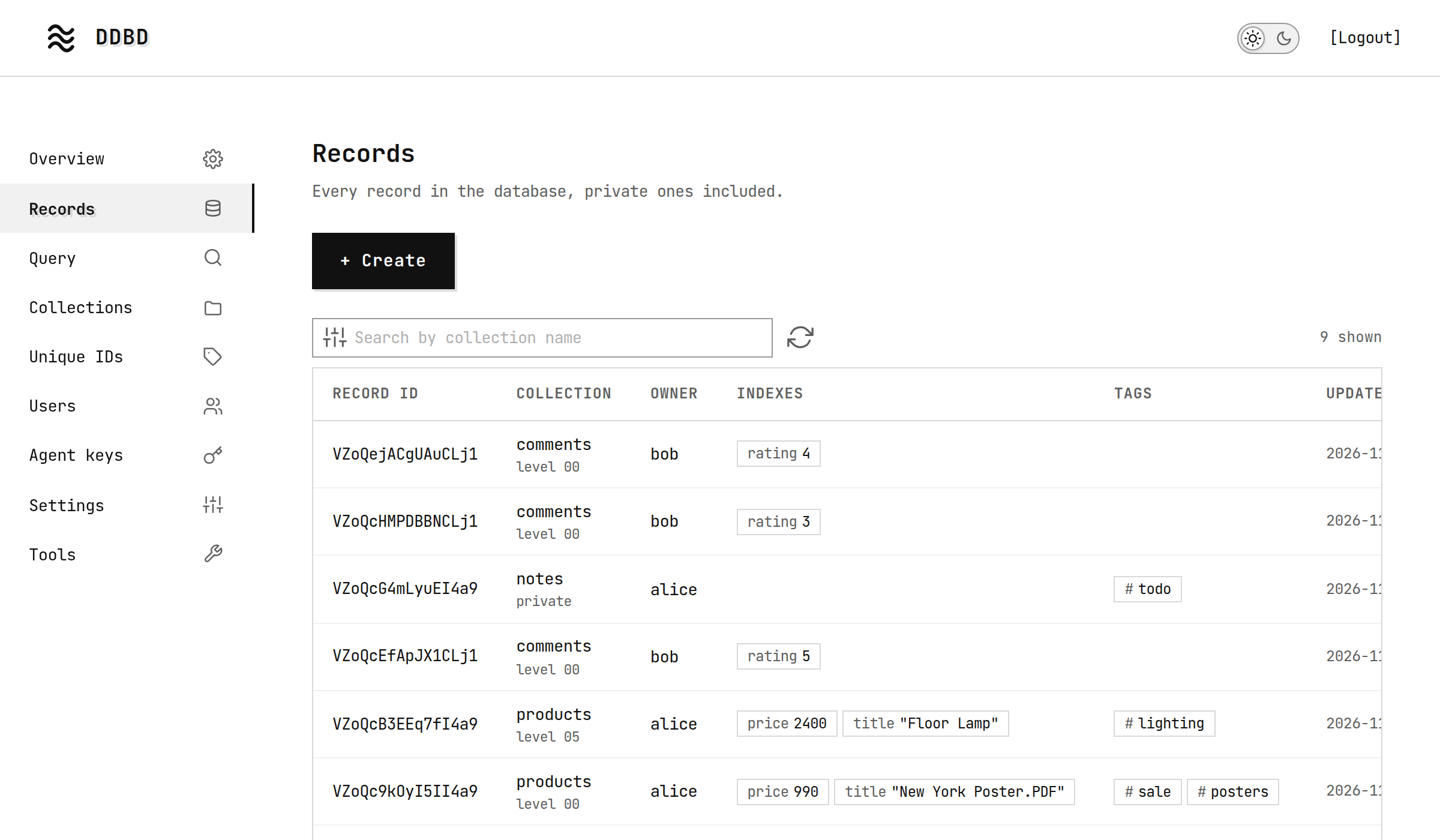
08 · Install
Running in a minute
- 1
Install
# Linuxcurl -fsSL https://cdn.broadwayinc.com/get/ddbd/v1 | shx86_64 or arm64, glibc 2.34 or newer. Puts ddbd in /usr/local/bin, or in ~/.local/bin without sudo.
# macOS 11 or newer, Apple Silicon or Intelbrew install broadwayinc/ddbd/ddbd - 2
Create a data folder
ddbd init --data ~/ddbd-data - 3
Start the server
ddbd start --data ~/ddbd-dataAnswers on http://localhost:7070.
- 4
Turn on the web admin
ddbd admin --data ~/ddbd-data web-passwordThen open http://localhost:7070 and add your first user.
DDBD speaks plain HTTP by default: run it behind HTTPS, or set it up with --tls. Getting started walks through the first user, record and query.

The database design behind Skapi
skapi.com is built on the DDBD record design. It serves developers worldwide and handles rapidly growing traffic from AI agents.
skapi.comFree and open source
DDBD is licensed under Apache-2.0. Use it, read it, change it.